Showing posts with label FACEBOOK. Show all posts

Installing Facebook Home on ANY android device !


If you are an Android User and you've heard of the new recently launched 'Facebook Home'
Which allows you to integrate facebook into your homescreens,
You might be disappointed because you found out that it only runs on certain High-End devices such as Galaxy SIII, Note II, HTC One X, etc...


But fear not, because it definitely is possible to install it on your android device as well !

You just need to install a modded version of Facebook Home which allows you to bypass any device restrictions, Meaning it will work on all android phones and tablets!

  1. Uninstall the original Facebook Application, Facebook Messenger, etc..             (you may need root access if your phone comes with preinstalled facebook app)                        
  2. Download these files:  Facebook Home and Facebook Messenger
  • Extract the RAR files and you will have 3 files:
  • com.facebook.katana.apk ( Facebook App. )
  • com.facebook.home.apk ( Facebook Home )
  • com.facebook.orca.apk ( Facebook Messenger )
Then Install the apps in the following order:
  1. First install Facebook App ( com.facebook.katana.apk )
  2. Then install Facebook Home ( com.facebook.home.apk )
  3. Then install Facebook Messenger ( com.facebook.orca.apk )
Now just open Facebook Home Application and you will see it Installed successfully.
Facebook Home Trick Install on Android
Selecting Facebook home as default launcher
You can also set Facebook Home as Default Launcher for Android.


www.nthacks.com © Nischal

Check if your Facebook account is accessed in another location

If you think that someone has accessed your account, checking the last location from where your account was accessed is very simple and practical.

Go to Your Account->Go to Account Settings->Go to Account Security. Here you can view your recent account activity. Also you can receive an email alert when a new computer or mobile device logs into your account.

Schedule Facebook messages


Sendible lets you schedule Facebook messages ahead of time so you can send messages to your friends, customers or colleagues in the future.
http://sendible.com/

How To Delete Your Enemy's Facebook Account


How To Delete Your Enemy's Facebook Account


This tutorial is education purpose only, once deleted profile can never be recovered.
Follow the steps given below:
  1. Victim’s profile link ( you can get it easily )
  2. His/Her Email which he/she uses to sign in
  3. His/Her birth date which he/she has used in the profile
  4. Make an Email ID on gmail or yahoo with the first name and last name same as on victim’sfacebook profile.
  • Click here to start:
  • Now you will get this screen
    • Enter details. In the place of ‘ email address where you can be contacted ‘ enter the fake email you created.
    • You will get an email on that ID in which facebook people will ask your problem. Reply to them that you are (put victim’s name here ) and you cant access your facebook account. Also you have lost access to your Email Address associated with the account
    • After 2-3 days you will get a reply. They will again ask you that you have access to your associated Email or not? Reply them that you still don’t have access to it. And repeat what all you wrote in first mail.
    • Next Day or Same Day you will get an Email that your account is disabled.

6 awesome fb chat tricks

MUST TRY This in Your Chat Box / FB Message
Just Copy the CODE and Paste it... Have FUN~

(Note: This is only works in PC/Laptop...Will not work if you're chatting from Mobile! )

TRY THIS...ITS AMAZING.. :)

dont try it in comments it will not work... try it in chat and msg from pc to ur friends

1.Mask

[[255006724575192]] [[255006727908525]] [[255006737908524]] [[255006734575191]] [[255006731241858]] 
[[255006827908515]] [[255006831241848]] [[255006824575182]] [[255006817908516]] [[255006821241849]] 
[[255006874575177]] [[255006871241844]] [[255006884575176]] [[255006877908510]] [[255006881241843]] 
[[255006934575171]] [[255006931241838]] [[255006941241837]] [[255006944575170]] [[255006937908504]] 
[[255007004575164]] [[255007001241831]] [[255006994575165]] [[255006997908498]] [[255006991241832]] 
[[255007084575156]] [[255007101241821]] [[255007077908490]] [[255007091241822]] [[255007081241823]] 

2. Jack Sparrow

[[298356520217565]] [[298356516884232]] [[298356506884233]] [[298356510217566]] 
[[298356513550899]] [[298356620217555]] [[298356606884223]] [[298356616884222]] 
[[298356610217556]] [[298356613550889]] [[298356673550883]] [[298356676884216]] 
[[298356666884217]] [[298356680217549]] [[298356670217550]] [[298356740217543]] 
[[298356733550877]] [[298356743550876]] [[298356730217544]] [[298356736884210]] 
[[298356823550868]] [[298356810217536]] [[298356820217535]] [[298356826884201]] 
[[298356813550869]] [[298356906884193]] [[298356896884194]] [[298356900217527]] 
[[298356903550860]] [[298356893550861]] [[298356950217522]] [[298356946884189]] 

3. Superman

[[299528860107644]] [[299528863440977]] [[299528866774310]] [[299528856774311]] 
[[299528870107643]] [[299528950107635]] [[299528943440969]] [[299528946774302]] 
[[299528953440968]] [[299528956774301]] [[299529013440962]] [[299529016774295]] 
[[299529010107629]] [[299529003440963]] [[299529006774296]] [[299529060107624]] 
[[299529063440957]] [[299529066774290]] [[299529070107623]] [[299529073440956]] 
[[299529173440946]] [[299529183440945]] [[299529180107612]] [[299529176774279]] 
[[299529186774278]] [[299529243440939]] [[299529236774273]] [[299529240107606]] 

4. Elmo

[[302117289844540]] [[302117283177874]] [[302117276511208]] [[302117279844541]] [[302117286511207]] [[302117366511199]] 
[[302117369844532]] [[302117373177865]] [[302117383177864]] [[302117379844531]] [[302117426511193]] [[302117436511192]] 
[[302117429844526]] [[302117423177860]] [[302117433177859]] [[302117523177850]] [[302117529844516]] [[302117526511183]] 
[[302117536511182]] [[302117533177849]] [[302117606511175]] [[302117596511176]] [[302117599844509]] [[302117593177843]] 
[[302117603177842]] [[302117646511171]] [[302117649844504]] [[302117659844503]] [[302117656511170]] [[302117653177837]] 
[[302117706511165]] [[302117703177832]] [[302117699844499]] [[302117709844498]] [[302117696511166]] [[302117749844494]] 

5. Troll face

[[242538225822042]] [[242538222488709]] [[242538232488708]] [[242538219155376]] [[242538229155375]] [[242538339155364]] 
[[242538335822031]] [[242538342488697]] [[242538345822030]] [[242538349155363]] [[242538392488692]] [[242538395822025]] 
[[242538399155358]] [[242538402488691]] [[242538405822024]] [[242538475822017]] [[242538472488684]] [[242538489155349]] 
[[242538492488682]] [[242538485822016]] [[242538562488675]] [[242538565822008]] [[242538569155341]] [[242538575822007]] 
[[242538572488674]] [[242538612488670]] [[242538625822002]] [[242538619155336]] [[242538622488669]] [[242538615822003]] 
[[242538675821997]] [[242538682488663]] [[242538672488664]] [[242538679155330]] [[242538685821996]] [[242538742488657]]

6. Mr. Bean

[[255016264574238]] [[255016271240904]] [[255016277907570]] 
[[255016267907571]] [[255016274574237]] [[255016384574226]] 
[[255016387907559]] [[255016394574225]] [[255016401240891]] 
[[255016391240892]] [[255016464574218]] [[255016454574219]] 
[[255016457907552]] [[255016461240885]] [[255016451240886]] 
[[255016537907544]] [[255016531240878]] [[255016534574211]] 
[[255016541240877]] [[255016527907545]] [[255016634574201]]

How to post blank status message on facebook


JUST ENTER

@+[0:0]

or

@+[0: ]

in the status and click on post

www.nthacks.com © Nischal

How to make a movie using your facebook timeline


Just go to
timelinemoviemaker
and
click
on
'Make your Movie'

www.nthacks.com © Nischal

Facebook emoticon text GENERATOR


How to post colorful alphabet emoticons on Facebook chat


Just paste the following codes to get the letters
Make sure to leave a space after each code
[[107015582669715]] = A
[[116067591741123]] = B
[[115602405121532]] = C
[[112542438763744]] = D
[[115430438474268]] = E
[[109225112442557]] = F
[[111532845537326]] = G
[[111356865552629]] = H
[[109294689102123]] = I
[[126362660720793]] = J
[[116651741681944]] = K
[[115807951764667]] = L
[[106596672714242]] = M
[[108634132504932]] = N
[[116564658357124]] = O
[[111669128857397]] = P
[[107061805996548]] = Q
[[106699962703083]] = R
[[115927268419031]] = S
[[112669162092780]] = T
[[108983579135532]] = U
[[107023745999320]] = V
[[106678406038354]] = W
[[116740548336581]] = X
[[112416755444217]] = Y
[[165724910215]]      = Z


OTHER COOL STUFF-


Add IMAGES to FB CHAT


Send a BLANK CHAT message


Post COOL image-text in FB CHAT


www.nthacks.com © Nischal

How to post cool image-text in Facebook

In my previous post - POST IMAGES IN FB CHAT
I had explained how to use the [[ and ]] square bracket trick in chat
You can use the same thing to post
Individual LETTERS in chat one after the other to form words

eg-or
eg- Paste this for YO
[[129122360527330]] [[173556336384]]
and press enter

To do this
you must search for pages like
'' The letter Y''
or ''The letter O''

Which have LETTERS as their profile pictures

and copy the page ID -
https://www.facebook.com/pages/The-Letter-Y/129122360527330or
https://www.facebook.com/group.php?gid=173556336384

And put it in [[ and ]] like the example given above
so it will be
[[129122360527330]] [[173556336384]]

and press enter.

That's it

Other COOL stuff -
Colorful Alphabet Emoticons in FB CHAT
Add IMAGES to FB CHAT
Send a BLANK CHAT message

www.nthacks.com © Nischal

How to send BLANK Chat messages on facebook


Don't know how to start a conversation in chat?
Wanna send a blank chat message so you don't have to?

Wanna prank your friends with this TOTALLY AWESOME trick

Just type the following in the chatbox-

[[gotanywhiter]]

and press enter
If you did it correctly
It should show a completely blank message like in the picture above
That's all

More COOL stuff -
Colorful Alphabet Emoticons in FB CHAT
Post IMAGES in FB CHAT
Post COOL image-text in FB CHAT


www.nthacks.com © Nischal

How to add images in Facebook Chat

Did you know that you can add IMAGES in Facebook Chat ?
Surprisingly, it's possible
Not ANY image you want,
The image must be the profile picture of a PERSON or a PAGE

Here's how to do it-
 For a PERSON's PROFILE PICTURE
  1. Copy the link of his/her profile
    It will be something like https://www.facebook.com/#!/profile.php?id=100000560410656
  2. COPY the profile id NUMBER highlighted above ^
  3. Paste it in the CHATBOX and add [[ and ]]
    So now it is like [[100000560410656]]
Then press enter and the image will appear in a small box

OR
If the person has a USERNAME   like   facebook.com/johndoe
The you can just do the same with the username

like [[johndoe]] and press enter


For a PAGE's PROFILE PICTURE


  1. Copy the link of the page. eg-
       https://www.facebook.com/pages/Some-Random-Page/122411147791536
Or  https://www.facebook.com/eminem

Then add [[ and ]] to it
so now it is [[122411147791536]]
or [[eminem]]

And press enter

That's all there is to it !

Also, see how to
Colorful Alphabet Emoticons in FB CHAT


Send a BLANK CHAT message


Post COOL image-text in FB CHAT

www.nthacks.com © Nischal

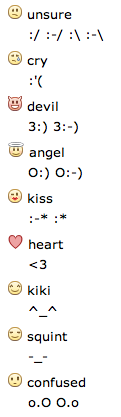
List of Facebook emoticons


www.nthacks.com © Nischal

How To flip your facebook status upside down

fliptext.org
write upside down
How to write upside down on Facebook, Twitter, Myspace or Blog.
Type in your text and push the "Flip Text" Button. It's cool
------------------------------------------------------------------------------------------------------------
¡ןooɔ s,ʇı ˙uoʇʇnq "ʇxǝʇ dıןɟ" ǝɥʇ ɥsnd puɐ ʇxǝʇ ɹnoʎ uı ǝdʎʇ
˙boןq ɹo ǝɔɐdsʎɯ 'ɹǝʇʇıʍʇ 'ʞooqǝɔɐɟ uo uʍop ǝpısdn ǝʇıɹʍ oʇ ʍoɥ
uʍop ǝpısdn ǝʇıɹʍ
bɹo˙ʇxǝʇdıןɟ

FLIPTEXT.ORG
 
www.nthacks.com © Nischal

Google+ vs Facebook

www.nthacks.com © Nischal

Facebook via Status Trick

>_Wanna update your Facebook status via :-


Just go to statusvia.net

and follow the instructions to fool your friends!

Have fun!


Retrieve Facebook chat history

How To Recover Facebook Chat History ?
Facebook Chat History Manager will easily be able to Recover Facebook Chat History whenever we want. Its a Firefox add-on but remember this will only start to save chat sessions after its installation. It won't be able to recover previous chat History.
You need Mozilla Firefox or Google chrome to use the addon
Firefox addon
  or Chrome plugin

www.nthacks.com © Nischal

How to use the old facebook chat system


As all of you may know, the new facebook chat system is stupid and annoying.


And has the following disadvantages-
  • We have to disable this bar at every login
  • Only shows the list of those who you chatted most
  • Unordered list of the friends regardless if they are online or offline
And how exactly do you get the old one back?
Just :

  • Login to your Facebook account.
  • Open this link in new tab.
  • Now you have the old chat box back!

By using this method you always have to open this link in a new tab.
But
If you're using Mozilla Firefox then it's even simpler :
  • Open the menu and select 'Bookmarks'
 
Select 'Organize bookmarks'
Set any name
Add   :  http://www.facebook.com/presence/popout.php
Check the 'Load this bookmark at sidebar' checkbox
Now if you want to chat, just press Ctrl+B

www.nthacks.com © Nischal

How to access Facebook, MSN, Twitter, Gmail and others from a single site

Trick to display custom message on Facebook


Here is a trick to display a custom message on Facebook
You can use this trick to prank your friends
Since the url is dynamic, you can change the message and page/tab title to anything you want

It is actually a loophole in their URL
Since they forgot to put an execution lock in it


And there you have it

You can fool your friends by making it say that their account is locked or deleted or anything you can think of.