Hacking Cellphones with Super Bluetooth Hack

This is an old software but its really awesome and has nice abilities to hack your victims phone and freak him out  Its calling feature works great once connected just you can call anyone with it and reduce your victims balance so enjoy this simple hack.

Super Bluetooth HackFeatures of Super Bluetooth Hack :

1.  You can Call from his phone

2.  Send message

3.  Read messages

4.  See contacts

5.  Delete anything

6.  Play songs

7.  Restart Phone

8.  Switch off

9.  Play ringtones

10. Restore Factory Settings

11. Steal data (songs , pics or games)


How to play WINDOWS games on MAC


Are you a mac user?

If yes
Then you must have thought of running all your pc games on your mac

It might also be that your Mac has better hardware than your pc
What a waste of gaming hardware right?

Actually there is a way of running pc games on a mac almost perfectly as if it were running on a pc
This works for some applications as well

There is a software called Transgaming Cider

It is used by game developers to release PC/MAC games or only MAC games

So a group of mac gamers who use already existing game wrappers and modified them for other games
have made a website Portingteam.com

Different people make wrappers for games and post them in the forum for members to download
if you need a username and password
Here -
------------------------------------------------------------------------------------------------------------------------------------------------------------------------------------------------------------------------------------------------------------------------
Username  : coolchillycat
Password   : srgmpdns
------------------------------------------------------------------------------------------------------------------------------------------------------------------------------------------------------------------------------------------------------------------------------------------------------------------------------------------------------------------------------------------------------------------------ENJOY-------------------------------------------------------------------------------------------------------------

How to add background music to your blogger blog


In this post, I'll concentrate on actually embedding the music (rather than adding widgets such as Last.fm playlists). You can see an example of embedded background music here and also further down this page...
The easiest method of adding background sound is to include a line like this in your blog template, just after the opening <body> tag:
<bgsound src="http://yoursite.com/yoursound.mp3" loop=infinite>
where the URL is that of the background music you wish to use. This method works perfectly well, but visitors to your site will not be able to switch the music off if it becomes distracting.
So instead, you may prefer to use this method instead, which is compatible with all browsers (press the play icon to start music):

This is achieved by including the following code somewhere in your template (eg: the sidebar):
<embed width="200" src="http://yoursite.com/yourmusic.mp3" autostart="false" loop="false" height="50"></embed>
You can change some of the variables to suit your needs:
  • autostart: set to "true" to make the music begin as soon as the page is loaded, or "false" to ensure the user has to press the play icon
  • loop: set to "true" to have the music play over and over, or "false" so that it plays only once.
  • height: if this is set to "40", only the play options will be visible. You can make this larger if you prefer, in which case blank space will be visible.
Using either method, you can link to .mp3, .mid or .wav music files. However, you must be aware of copyright restrictions, and ensure you have the appropriate permission for use for the music you decide to use!
Here are some sites I've used for copyright-free music you could use in your blog:


This information is from bloggerbuster.com

Run Mobile JAVA Games and Apps on your PC

Do you want to run JAVA Games and Apps on ur PC, then this guide will help you out in running al the .jar games and apps on your PC.
Things you will need .:
1. Mobile Phone Emulator: we will use SjBoy Special Edition v1.0

Features of SjBoy Special Edition v1.0 .:
1. Simulation more quickly. Sjboy is based on the realization Sun MIDP2.0 framework, based on a
   lot of optimization, to speed has been improved.
2. Support dynamic change conform. Currently in sjboy including Nokia40 V1, Nokia 60,Moto V3, SE built-in skins.
3. Screen capture. You can right-interception current screen content, and as your desktop theme.
   Currently supports the preservation of BMP format.
4. Rich API. Including the mainstream market models, and the game/programs might need all the
   pictures and sound formats.


Spy anyone using your Mobile Phone

For using this trick you will need the following things .:
1. Mobile handset
2. Set of Headphones
Lets begin the step by step tutorial on how to spy using your mobile phone .:
1. Plug in your headset/earphone into your mobile phone.
2. Now go to settings of your mobile phone and find the setting for auto answer and activate it.
3. Now turn off the ringtone/volume of your mobile phone also make sure that the vibration is also turned off.
5. Also make sure that the lights of your phone are turned off or place it in such a place where its lights cannot be noticed.
4. Place the mobile phone in some hidden place and make sure that voices of the room can be easily heard through this mobile phone.
5. Now whenever you want to check what is going in the room just dial the mobile number with some other phone.
6. Your phone will be picked automatically and you can hear clearly what’s happening in the room.

Free Email Alerts on Mobile Using Way2SMS

This post will teach a unique way of getting and pushing your emails from your online inbox to your SMS Inbox without any GPRS or 3G enabled Phone it will be for free and we will take help of Way2SMS service which is very Free sms from internet to Mobile Based service.
Follow the Steps Below .:
Step1: Register and login to www.way2SMS.com.
Step2: Register your mobile number.
Step3: As soon as you complete the registration you will receive a Unique Verification ID on your mobile as SMS, complete the verification process.
Step4: Login to Your Account .
Step5: Go To Dashboard tab
Way2SMS
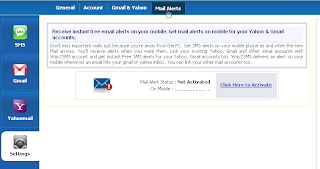
On Right Side Go to Settings ----> then Go To Mail Alerts
Way2SMS
Click on given Click Here to Activate link.

Way2SMS


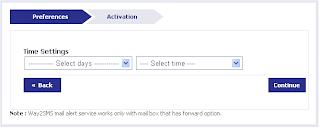
Go thru Preferences and Activation Tab ...and Click On Continue...
Way2SMS
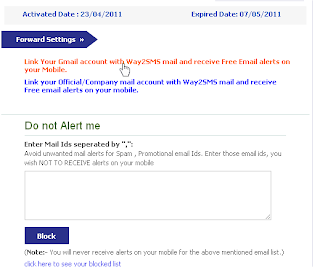
Then Go to Forward Settings and Click on first Link(or Second According to your Choice).
Way2SMS
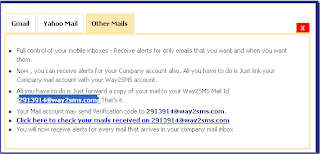
Copy the given id of Way 2 sms.. ex: 2313914@way2sms.com
Step 6: Then Login in to Your Gmail Account.
Go To Mail Settings …

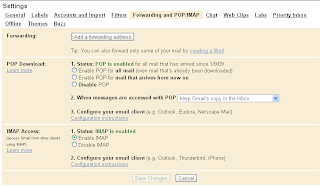
Then in Settings Click to Forwarding and POP/IMAP
Way2SMS
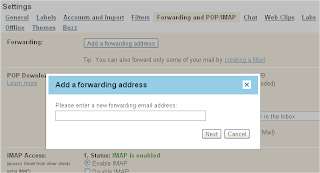
Then Enable the Last one IMAP Access and in the First one Forwarding Click on Add a Forwarding Address ...
Way2SMS
Paste Here That Id of Way2sms (ex: 2313914@way2sms.com) ..
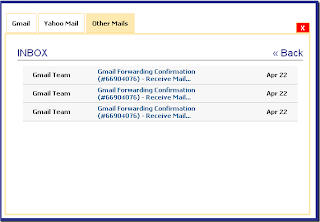
Then In Your Way2Sms Account in Others Mail option Click The Given Link ...
Way2SMS
You will get an mail from Your Email Account ...
Way2SMS
Open it and then Copy the Confirmation Code and Paste it into Your Email Verify option Box. and Click to Verify.
Way2SMS
AND YOU ARE DONE

Cool Google Tricks

Google is mass search engine used all over the world by everyone for just searching anything and it provides some of the best useful services which gives you a unique control but you know the best side of Google it has some of the coolest working tricks which you need to check as they are really smile getting ones.\
1. Google gravity:- We all have read the Newton’s law of gravity.Does it also apply to Google? To test it follow the instructions
Go to Google.com
Type Google Gravity
Click on I’m feeling Lucky
Now you will see the effect of gravity on Google.The Google icon will fall down automatically.You can even pickup and throw Google icon any ware.
2. Google Pacman Game:-Just go the the link google.com/pacman
3. Change Background Image:-You can also change the background image of Google image.To change the background image follow the instructions
Go to Google.com
Click on the Change Background Image
Login with Gmail username and upload Image
This will not work if you open the encrypted Google.To open unencrypted version Click Here
4. Epic Google:- In epic Google you will see the font size of Google increasing automatically as if it will come out of your computer screen.To use Google Follow the instructions
Go to Google.com
Type Epic Google
Click on I’m feeling Lucky
5. Google Hacker:-want to see how the Google homepage will look if it gets hacked .Follow the instructions below
Go to Google.com
Type Google Hacker
Click on I’m feeling Lucky
6. Annoying Google:- In this trick the capitalization of your searches will change automatically.Some words will change into small letter and some into capital letters in your search result.Want to try it follow the instructions
Go to Google.com
Type Annoying Google
Click on I’m feeling Lucky